Xteink Lover is a private bookshelf on the web. Drop files from your phone or computer, from anywhere. The reader opens the shelf over OPDS and downloads them, on any Wi-Fi, no shared network needed.
What it does
- Drop a file, it’s on the shelf. EPUBs go straight in. MOBI, AZW3, PDF, CBZ comics, Markdown, TXT and HTML are converted to EPUB in your browser; no server does the conversion.
- Paste an article link. The page extracts the main text and images into an EPUB. On Android, install the page as an app and use Share → Xteink Lover from anywhere.
- A display-case bookshelf. Each shelf is a row of covers on a wooden plank with a brass name plate. Drag books between shelves. One book, one shelf, like a real bookcase.
- Covers found for you. Books with an ISBN get the exact edition’s cover. Otherwise search Google Books and Open Library and pick one.
- The reader sees exactly your shelves. Each shelf shows up as a folder in the reader’s OPDS catalog. Unsorted books stay off the reader, so it stays tidy.
- Reading-progress sync. It speaks KOReader’s KOSync protocol, so you can read on the Xteink and pick up at the same page in KOReader on a jailbroken Kindle.
- “What I read this month” image. When a reader syncs past 97%, the finish date is recorded. Press Share for a bookcase picture of the month’s books, sized for social media.
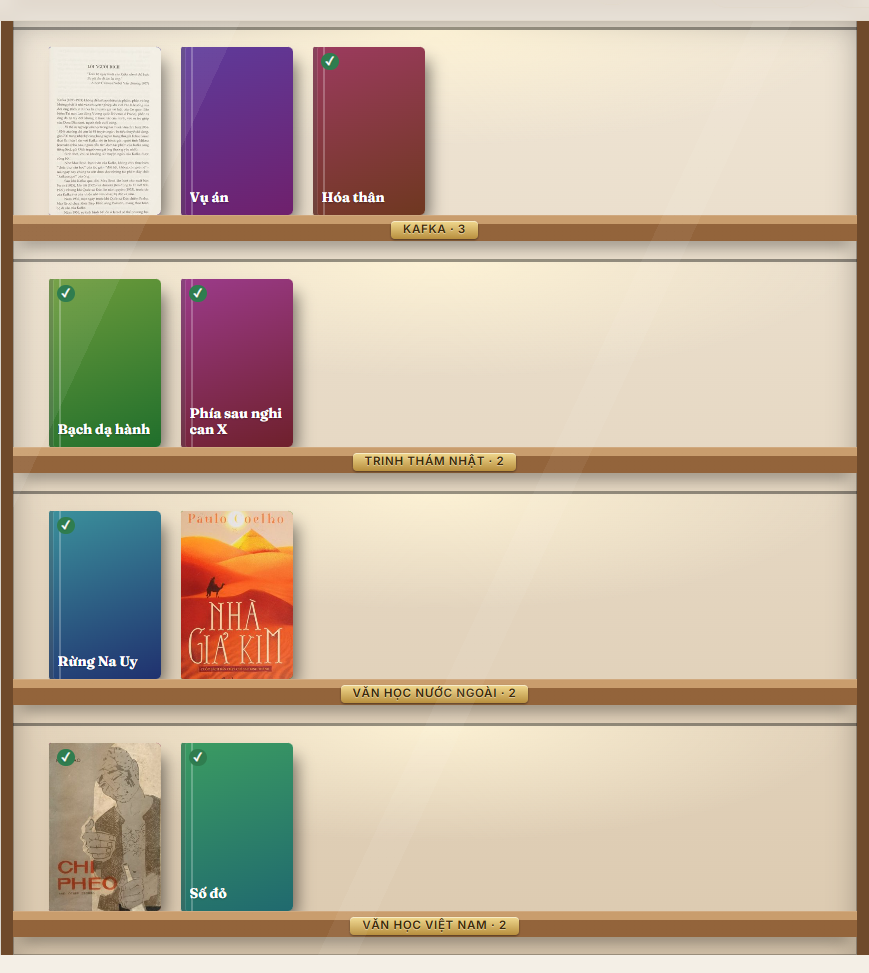
The display case: real covers where one was found, text covers where not. ✓ means finished.
Three ways to run it
| Option | For | Computer must stay on? |
|---|---|---|
| Try it at xteinklover.ongk.dev | A quick look | No |
| Your own copy on Cloudflare (Deploy to Cloudflare button) | Your own shelf, reachable anywhere, free | No |
| Docker (NAS, home server) | Self-hosters who’d rather skip Cloudflare | The server does |
| Download and run (Windows, macOS, Linux) | No command line, please | Yes |
The demo is shared and has limited space. For daily use, run your own copy: Cloudflare’s free plan gives you 1 GB for books, no card needed.
The download: double-click to run
Grab the file for your computer from Releases (about 35 MB on Windows), unzip, double-click xteinklover. A console window shows the OPDS address for your reader and your browser opens the shelf. Create your account right away. Close the window to stop.
The app isn’t signed with Microsoft or Apple, so:
- Windows says “Windows protected your PC”: choose More info → Run anyway, and Allow network access or the reader can’t connect.
- macOS, first launch: right-click the file → Open.
Docker
git clone https://github.com/ptk862010/xteinklover && cd xteinklover
echo "SIGNUP_CODE=pick-a-word" > .env
docker compose up -d
Open port 8787 and create your account with that invite code. Accounts and catalog live in one SQLite file, books in a folder, all inside the /data volume. For access from outside, put it behind Cloudflare Tunnel or Tailscale.
Copy shelves straight to the SD card
Only the Docker and download versions can do this, because they run on the same network as the reader.
Over OPDS, CrossPoint saves every book into one folder. I wanted the Mystery shelf on the web to be a Mystery folder on the reader, and CrossPoint’s code showed that needs a firmware change. But CrossPoint’s File Transfer mode has a small HTTP API: list folders, create folders, upload, move, delete.
Hence the 📲 Copy to reader button: open File Transfer on the reader, type the IP shown on its screen, press Check. The page compares your shelves with the SD card, then:
- copies missing books into
/Sach/<shelf name>/as “Author - Title.epub”; - re-copies books whose file changed;
- moves a file to the new folder when you move the book to another shelf;
- lists books you removed from the shelf so you can tick which to delete; nothing is deleted on its own.
It only touches folders named after a shelf. Your other folders (PDFs, fonts, screenshots) stay as they are.
A true story
While testing, I sent the reader an upload request with no file attached, just to see the reply. It froze and rebooted. CrossPoint runs on a small chip and doesn’t like odd requests, so the real thing copies one book at a time, always with complete requests.
”What I read this month”
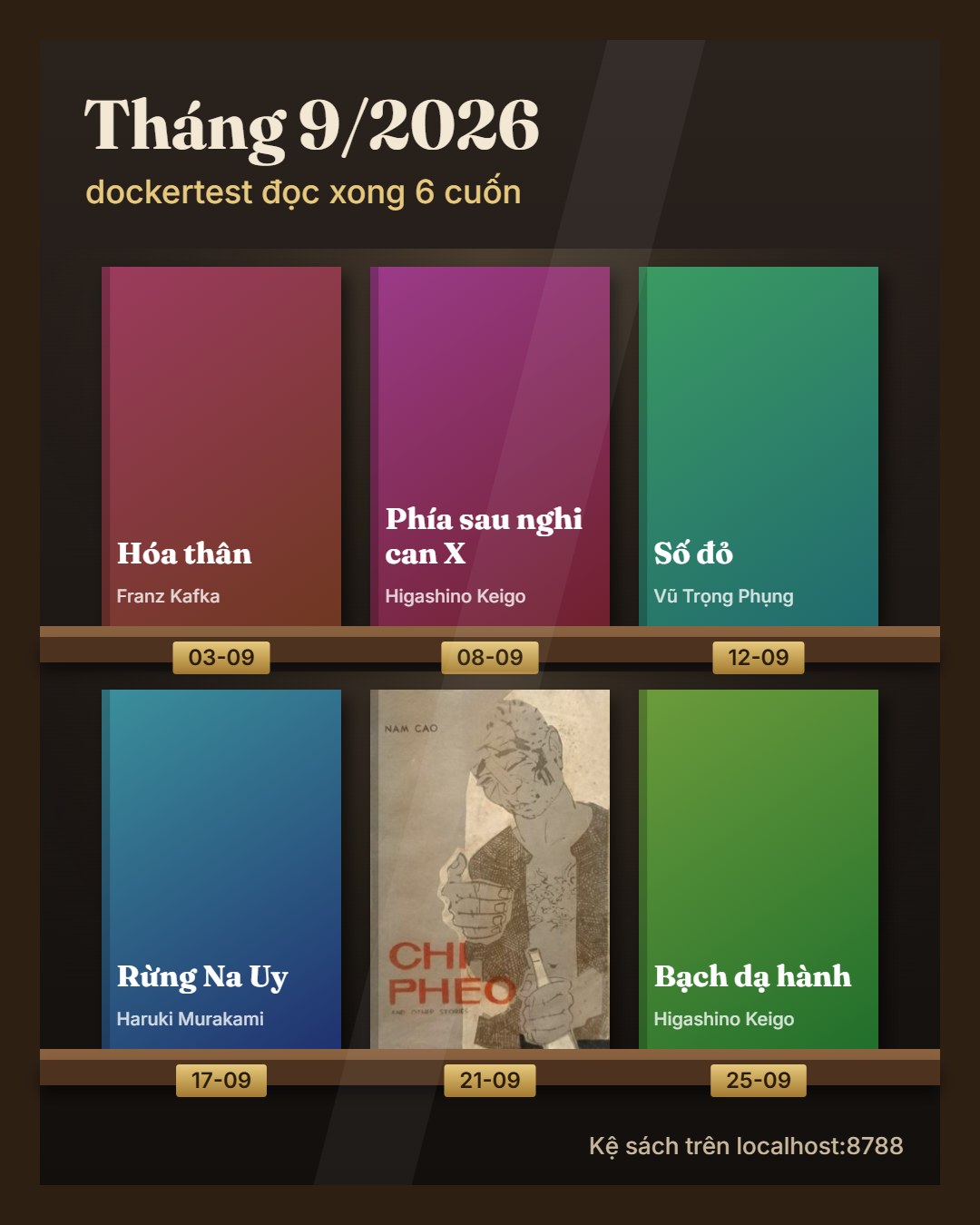
The image is drawn in your browser and never uploaded. Pick this month, last month, this year, last year or a custom range. Ten books are laid out 4 + 3 + 3; past 20 it says “and N more”.
Things I learned building it
- Finding covers for Vietnamese books is harder than it looks. Exact-phrase title searches on Google Books often return a different book by the same author. Per-word search plus ranking by title match works much better, but the user still picks; nothing is assigned automatically.
- One codebase, three homes. Cloudflare, Docker and the download share all the server code; only storage changes (Cloudflare D1 and KV become SQLite and a folder). All three pass the same 36 integration tests before a release, including the macOS builds on GitHub’s real Macs.
- The download’s size is Node, not the app. The app itself is about 2.6 MB; Node is over 90 MB. Zipped it’s about 35 MB, fine for a double-click app.
Source code
Xteink Lover is open source under the MIT license: github.com/ptk862010/xteinklover. The reader needs CrossPoint firmware (the stock Xteink firmware has no OPDS); see how to install it.